424 AgendaView · 日程列表
用途
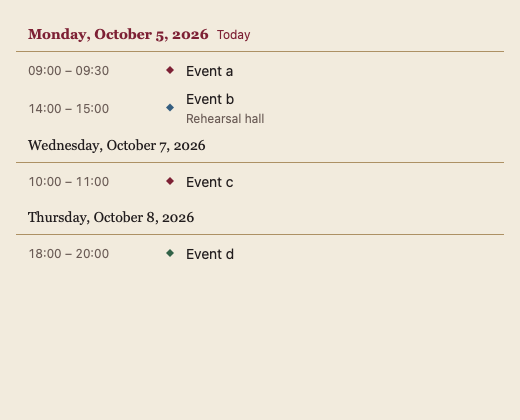
按日分组的日程列表,日期标题在滚动时固定在顶部;只构建可见行,适合大量事件。
最小示例
loc := time.Local
events := exampleEvents(loc)
view := func(c *ui.Context) {
	core.Use(c, core.Settings{})
	opts := datetime.AgendaViewOptions{Location: loc, From: core.Date{Year: 2026, Month: time.October, Day: 12}, Days: 14}
	if id, ok := datetime.AgendaView(c, events, opts).Opened(); ok {
		fmt.Println("open", id)
	}
}
ui.Render(view, 400, 300, 1)
参数
func AgendaView(c *ui.Context, events []CalendarEvent, opts AgendaViewOptions) CalendarViewResult
| 字段 | 类型 | 默认值 | 含义 |
|---|---|---|---|
Location | *time.Location | 必填 | 切分日期与显示时间所用的时区;为 nil 时 panic,不做隐式 UTC 转换。 |
Version | int | 0 | 事件在原切片内被修改时须改变;换新切片会被自动发现。 |
From | Date | 零值(今天) | 列表的第一天。 |
Days | int | 0(即 30) | 列出的天数。 |
Today | Date | 零值(系统时钟) | 标记为今天的日期。 |
Hour12 | bool | false | 12 小时制显示时间。 |
Disabled | bool | false | 禁用:不响应点击、拖动与快捷键,弹层随之关闭。 |
Label | string | 内置文案 | 辅助技术读出的名称。 |
状态
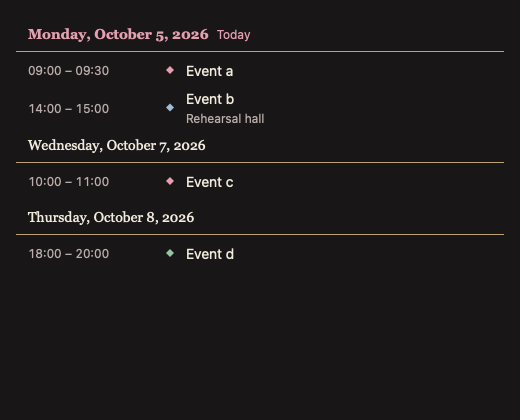
默认、悬停、聚焦、今日标题(强调色 + “今天”)、空状态、禁用。
事件
Opened() 返回被激活事件的 ID。
键盘操作
- Tab 进入列表,↑/↓ 在事件间移动,Enter 打开。
限制
- 跨越多天的事件在每一天下各列一次。
- 时间按调用方给定的
Location计算与显示;夏令时跳过或重复的墙上时间会报告,不自动移动。 - 事件由调用方持有:视图只报告移动、调整与新建(
Changed()),由调用方写回数据。