265 AgentStepList 执行步骤列表
用途
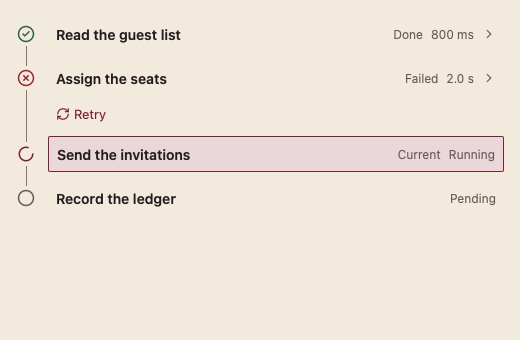
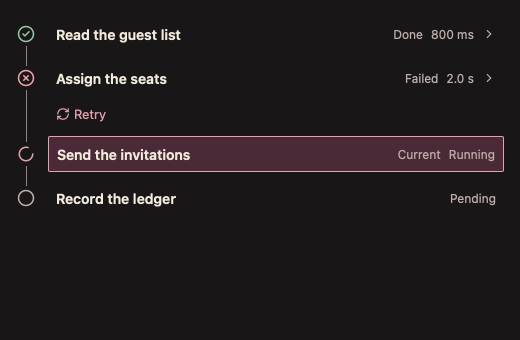
以时间线显示 Agent 的执行步骤:当前步加框标出,步骤可展开详情,失败步提供重试。
最小示例
steps := []agent.AgentStep{
	{ID: "read", Title: "Read the guest list", State: agent.AgentDone, Duration: time.Second},
	{ID: "seat", Title: "Assign the seats", State: agent.AgentFailed, Detail: "Table 4 is full."},
	{ID: "send", Title: "Send invitations", State: agent.AgentPending},
}
view := func(c *ui.Context) {
	core.Use(c, core.Settings{})
	if r := agent.AgentStepList(c, steps, agent.AgentStepListOptions{}); r.Retry != "" {
		fmt.Println("retry", r.Retry)
	}
}
ui.Render(view, 400, 300, 1)签名:func AgentStepList(c *ui.Context, steps []AgentStep, opts AgentStepListOptions) AgentStepListResult。步骤 ID 为空或重复、Title 为空时 panic。
参数
| 字段 | 类型 | 默认值 | 含义 |
|---|---|---|---|
Disabled | bool | false | 禁止展开与重试。 |
Still | bool | false | 停止执行中动画;系统减少动画时也自动静止。 |
状态
AgentStep字段:ID、Title、Detail、State、Duration。AgentState:AgentPending、AgentPlanning、AgentRunning、AgentWaiting、AgentDone、AgentFailed、AgentSkipped,越界 panic。状态同时由图标形状和文字表达,不只靠颜色。- 当前步是第一个执行中、等待或规划中的步骤,用选中底色、边框和“当前”文字标出。
- 失败步下方显示“重试”。
事件
Toggled:本帧展开或折叠的步骤 ID。Retry:本帧请求重试的步骤 ID。
键盘操作
- Tab 进入列表;↑ ↓ 在步骤与重试按钮间移动;Enter / Space 展开详情或重试。
限制
- 步骤数量较少时使用;列表不虚拟化。