338 VariablesPanel · 变量面板
用途
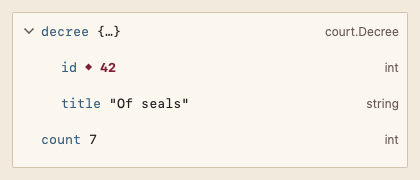
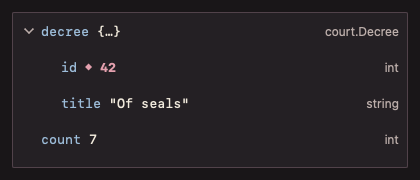
以树显示调试变量,可展开结构,标出自上次停止以来变化的值,并在行内修改叶子变量的值。
最小示例
vars := []code.Variable{{Name: "decree", Value: "{…}", Children: []code.Variable{{Name: "id", Value: "42", Changed: true}}}, {Name: "count", Value: "7"}}
var state code.VariablesPanelState
view := func(c *ui.Context) {
	core.Use(c, core.Settings{})
	r := code.VariablesPanel(c, vars, &state, code.VariablesPanelOptions{})
	r.Element.Height(200)
	if r.Edited != nil {
		fmt.Println("set", r.Edited.Path, "=", r.Edited.Value)
	}
}
ui.Render(view, 400, 300, 1)
参数
func VariablesPanel(c *ui.Context, vars []Variable, s *VariablesPanelState, opts VariablesPanelOptions) VariablesPanelResult。变量按名称以点连接成路径作为键,同层重名 panic。修改值通过结果交给调用方写回调试器并传入新值。
| 字段 | 类型 | 默认值 | 含义 |
|---|---|---|---|
Variable.Name, Value, Type | string | — | 名称、显示值与类型。 |
Variable.Changed | bool | false | 值自上次停止后变化。 |
Variable.Children | []Variable | nil(叶子) | 成员;非 nil 时可展开。 |
Disabled | bool | false | 不能编辑。 |
状态
变化的值以菱形标记、粗体与 AccentText 显示并带无障碍描述“已变化”;编辑中的输入框;选中行 Selection;无变量;禁用。
事件
Edited:新值与变量路径。
键盘操作
- Tab 到达树;↑/↓ 移动,→ 展开,← 折叠。
- 叶子上 Enter、F2 或双击:编辑;Enter 确认,Escape 取消。
限制
- 子项不支持按需加载;需要时调用方在展开后补充
Children。