307 CommitGraph 提交图谱
用途
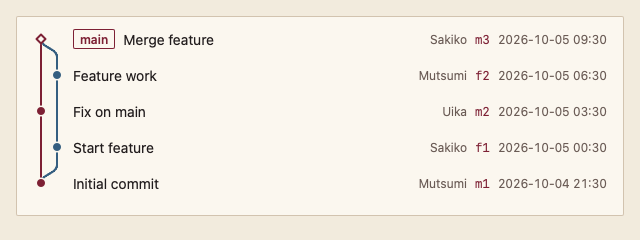
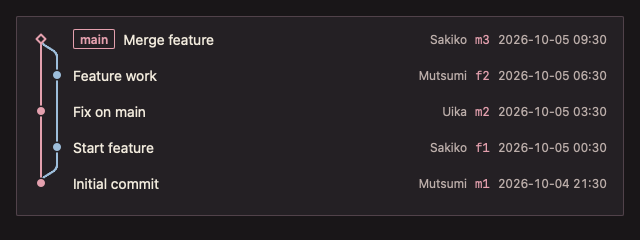
按从新到旧的顺序显示提交,左侧绘制泳道、分支与合并线;只构建可见行,可承载十万级提交。
最小示例
var state git.CommitGraphState
commits := []git.Commit{
	{Hash: "c3", Parents: []string{"c2", "b1"}, Subject: "Merge branch", Refs: []string{"main"}},
	{Hash: "b1", Parents: []string{"c1"}, Subject: "Feature"},
	{Hash: "c2", Parents: []string{"c1"}, Subject: "Fix"},
	{Hash: "c1", Subject: "Initial commit"},
}
view := func(c *ui.Context) {
	core.Use(c, core.Settings{})
	git.CommitGraph(c, &state, commits, git.CommitGraphOptions{}).Element.Height(240)
}
ui.Render(view, 400, 300, 1)签名:func CommitGraph(c *ui.Context, s *CommitGraphState, commits []Commit, opts CommitGraphOptions) GitListResult
参数
Commit
| 字段 | 类型 | 默认值 | 含义 |
|---|---|---|---|
| Hash | string | 必填 | 提交哈希;为空时 panic。 |
| Parents | []string | nil | 父提交;两个以上为合并提交。 |
| Author | string | "" | 作者。 |
| When | time.Time | 零值 | 提交时间。 |
| Subject | string | "" | 提交标题。 |
| Refs | []string | nil | 指向该提交的分支与标签。 |
CommitGraphOptions
| 字段 | 类型 | 默认值 | 含义 |
|---|---|---|---|
| TimeFormat | string | "2006-01-02 15:04" | 时间格式。 |
| MaxLanes | int | 0(即 8) | 图谱最多显示的泳道数,超出部分裁剪;为负 panic。 |
| Status | DataStatus | DataReady | 加载、追加、失败状态。 |
| Error | string | "" | 失败说明。 |
CommitGraphState.List 保存选择(Selected() 返回哈希)。泳道布局在提交切片或长度变化时计算一次,不在每帧计算。提交须按子提交在前的拓扑顺序给出。给返回的 Element 一个高度。
状态
- 普通提交为实心圆点,合并提交为空心菱形,形状区分而不只靠颜色。
- 泳道颜色取自 AccentText、Info、Success、Warning、Danger、TextMuted,按位置区分。
- 选中行:Selection 背景与对勾。
事件
Changed()选择变化;Submitted()双击或 Enter 打开提交。
键盘操作
- Tab 进入列表;↑/↓、Home/End 移动选择;输入标题开头字母跳转;Enter 打开。
限制
- 原地修改提交切片而不改变其地址与长度时,布局不会重算;请传入新切片。
- 泳道数超过 MaxLanes 时,右侧泳道被裁剪。