327 CodeViewer · 代码查看器
用途
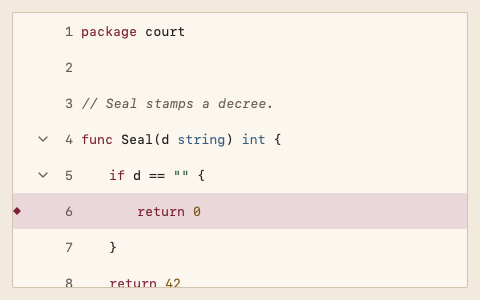
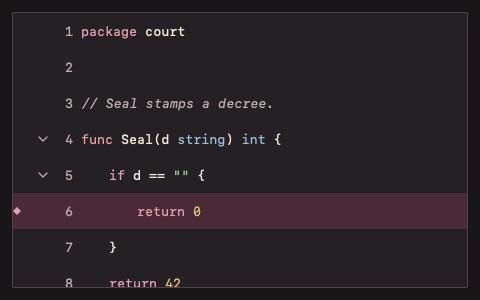
只读代码视图:行号、基础语法着色(internal.Highlight)、按缩进折叠、当前行、选择复制;大文件只构建可见行。
最小示例
lines := []string{"func Seal(d string) int {", "\treturn len(d)", "}"}
var state code.CodeViewerState
view := func(c *ui.Context) {
	core.Use(c, core.Settings{})
	code.CodeViewer(c, lines, &state, code.CodeViewerOptions{Language: "go"}).Element.Height(240)
}
ui.Render(view, 400, 300, 1)
参数
func CodeViewer(c *ui.Context, lines []string, s *CodeViewerState, opts CodeViewerOptions) ChoiceResult。块注释状态与折叠范围在代码变化时扫描一次。s.Line() 返回当前行,s.GoTo(line) 跳转并展开遮住它的折叠,s.Visible() 返回可见行范围,s.ScrollTo(line) 只滚动;s.Selection 保存选中行,s.Folded 保存折叠起始行。
| 字段 | 类型 | 默认值 | 含义 |
|---|---|---|---|
Language | string | ""(纯文本) | go、javascript、typescript、python、json、shell、sql。 |
Label | string | "" | 无障碍名称。 |
Disabled | bool | false | 不能折叠。 |
状态
当前行(Selection 背景与菱形)、选中行(Selection 背景)、可折叠行(向下箭头)、已折叠(向右箭头)、空代码、禁用。关键字 AccentText、字符串 Success、数字 Warning、类型 Info、注释 TextMuted 斜体。
事件
Changed():当前行或选择变化。
键盘操作
- ↑/↓、Home/End:移动当前行;Shift+方向键扩展选择;Cmd/Ctrl+A 全选。
- Cmd+C(macOS)/ Ctrl+C:复制选中行,未选则复制当前行。
- ←:折叠当前行开始的块;→:展开。折叠按钮可用 Tab 到达。
限制
- 折叠按缩进推断,不解析语法;空行不结束块。
- 只读,不提供编辑与行内(字符级)选择。