336 BreakpointList · 断点列表
用途
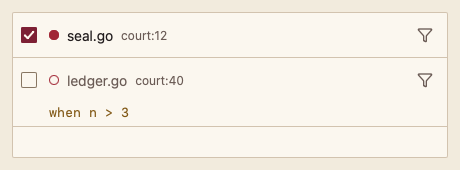
列出断点:启用开关、跳到源码位置、行内编辑条件断点。
最小示例
bps := []code.Breakpoint{{ID: "a", File: "court/seal.go", Line: 12, Enabled: true}, {ID: "b", File: "main.go", Line: 9, Condition: "n > 3"}}
view := func(c *ui.Context) {
	core.Use(c, core.Settings{})
	r := code.BreakpointList(c, &bps, code.BreakpointListOptions{})
	r.Element.Height(200)
	if r.Toggled != "" || r.Edited != "" {
		fmt.Println("sync breakpoints with the debugger")
	}
}
ui.Render(view, 400, 300, 1)
参数
func BreakpointList(c *ui.Context, bps *[]Breakpoint, opts BreakpointListOptions) BreakpointListResult。组件直接修改 *bps 中的 Enabled 与 Condition;ID 为空或重复时 panic。
| 字段 | 类型 | 默认值 | 含义 |
|---|---|---|---|
Breakpoint.ID | string | 必填 | 稳定标识。 |
Breakpoint.File, Line | string, int | — | 位置。 |
Breakpoint.Enabled | bool | false | 是否启用。 |
Breakpoint.Condition | string | "" | 条件表达式,非空时显示“当 …”。 |
Disabled | bool | false | 不能修改与跳转。 |
状态
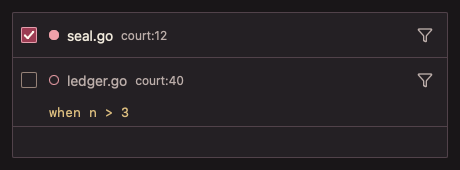
启用为实心圆点,停用为空心圆点并降低文字色;条件以 Warning 等宽文字显示;编辑中的输入框;无断点;禁用。
事件
Toggled、Edited、Opened:本帧被切换、改条件、要打开的断点 ID。
键盘操作
- Tab 依次到达复选框、位置按钮与编辑条件按钮;Space 切换启用;Enter 打开位置。
- 条件输入框:Enter 确认,Escape 取消。
限制
- 不提供删除与新增;由调用方修改
*bps。