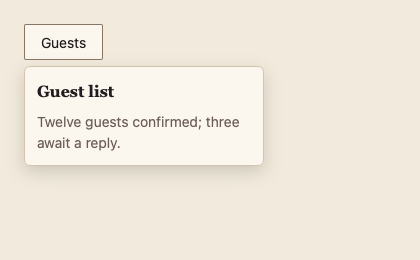
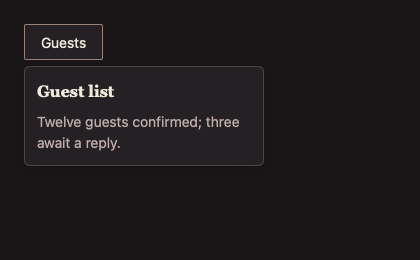
084 Popover 弹出框
用途
在锚点下方显示可交互的面板;空间不足时翻到上方,并保持在窗口内。外部点击与 Escape 关闭。
最小示例
open := true
view := func(c *ui.Context) {
	core.Use(c, core.Settings{})
	b := input.Button(c, "Guests", input.ButtonOptions{Variant: input.Secondary})
	if b.Clicked() {
		open = !open
	}
	overlay.Popover(c, b, &open, overlay.PopoverOptions{Title: "Guest list"}, func() {
		ui.Text(c, "Twelve guests confirmed.")
	})
}
ui.Render(view, 400, 300, 1)签名:func Popover(c *ui.Context, anchor *ui.Element, open *bool, opts PopoverOptions, content func()) *ui.Element。anchor 必须是本帧已构建的元素,nil 时 panic。
参数
| 字段 | 类型 | 默认值 | 含义 |
|---|---|---|---|
Title | string | "" | 面板顶部的衬线标题,同时命名面板。 |
Width | float32 | 0 | 固定宽度;0 时随内容,至少与锚点同宽,最多 360。 |
Label | string | "" | 无标题时的无障碍名称。 |
状态
- 6 DIP 圆角、Surface 底色、1 DIP 边框、160 ms 淡入。
- 面板最高为锚点上下较大一侧的空间,超出时滚动。
- 锚点首帧尚未布局时面板保持透明,避免闪到窗口左上角。
事件
外部点击与 Escape 把 *open 设为 false;内容内控件自行报告事件。
键盘操作
| 按键 | 行为 |
|---|---|
| Tab | 从锚点进入弹层,弹层元素紧跟锚点排序。 |
| Escape | 关闭并把焦点还给锚点。 |
限制
- 打开期间外部点击只用于关闭,不传给下方控件:
PopoverBase用覆盖整窗的背板接收点击(ui/base.go:373)。 - Escape 只关闭最上层的 MujicaUI 浮层(窗口内按打开顺序记录)。MyGo 自带的
ui.Popover、ui.Select弹层不在这份记录中;它们打开在非模态 MujicaUI 浮层之上时,Escape 可能先关闭下面的 MujicaUI 浮层。 - 只支持下方与上方两个位置(
ui/widgets.go:689keepInWindow);宽度不超过窗口,过高时内容滚动。