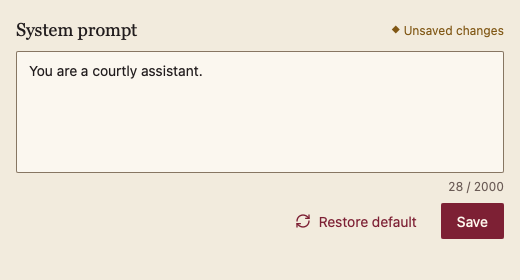
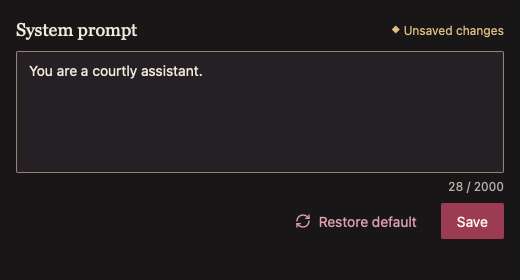
254 SystemPromptEditor · 系统提示编辑器
用途
多行编辑系统提示,显示字数,可恢复默认,有未保存标记,Cmd/Ctrl+S 保存。
最小示例
prompt, saved := "You are helpful.", "You are helpful."
view := func(c *ui.Context) {
	core.Use(c, core.Settings{})
	if chat.SystemPromptEditor(c, &prompt, chat.SystemPromptEditorOptions{Default: "You are helpful.", Saved: saved}).Save {
		saved = prompt
	}
}
ui.Render(view, 400, 300, 1)
参数
func SystemPromptEditor(c *ui.Context, value *string, opts SystemPromptEditorOptions) SystemPromptEditorView。
| 字段 | 类型 | 默认值 | 含义 |
|---|---|---|---|
Default | string | "" | 恢复默认时写回的文字。 |
Saved | string | "" | 最近一次保存的文字;与当前值不同即显示“未保存”。 |
MaxLength | int | 0 | 字数上限:显示 n / 上限,超出时提示并禁止保存。 |
Saving | bool | false | 调用方正在保存,编辑被阻止。 |
Disabled | bool | false | 禁用。 |
状态
已保存、未保存(警告色菱形 + 文字)、超出上限(错误提示)、保存中、禁用。
事件
Save:请求保存当前值;Restored:已恢复默认。
键盘操作
- Tab:进入文本框,再到恢复默认与保存按钮。
- Cmd+S(macOS)/ Ctrl+S:保存(有改动且未超限时)。
限制
- 超出上限不会截断文字,只阻止保存。