091 Alert 提示条
用途
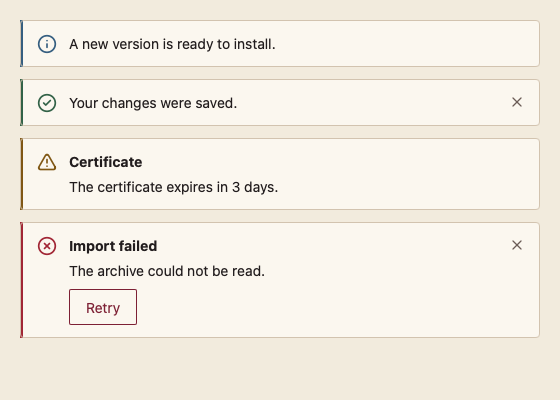
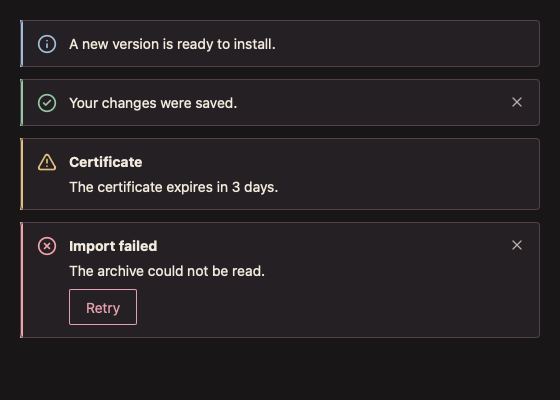
在页面内显示一条信息、成功、警告或错误提示,可带标题、一个操作按钮和关闭按钮。严重程度同时由左侧色条、图标和无障碍名称(如“Error”)表达,不只靠颜色。
最小示例
open := true
r := feedback.Alert(c, &open, "The archive could not be read.", feedback.AlertOptions{
	Severity: core.SeverityError,
	Title:    "Import failed",
	Action:   "Retry",
})
if r.Action {
	// retry the import
}签名:func Alert(c *ui.Context, open *bool, message string, opts AlertOptions) AlertResult
参数
| 字段 | 类型 | 默认值 | 含义 |
|---|---|---|---|
open | *bool | nil | 非 nil 时显示关闭按钮,关闭后置为 false;为 false 时不构建任何元素。nil 表示不可关闭。 |
message | string | 必填 | 正文;为空时 panic。 |
Severity | Severity | SeverityInfo | SeverityInfo、SeveritySuccess、SeverityWarning、SeverityError。 |
Title | string | "" | 正文上方的粗体标题。 |
Action | string | "" | 操作按钮文字;为空不显示。 |
返回 AlertResult{Element, Action, Closed};关闭状态下 Element 为 nil。
状态
四种严重程度;操作与关闭按钮有悬停、按下和 2 DIP 焦点环。警告与错误在出现或文字变化时通过 Context.Announce 播报一次。
事件
Action:操作按钮被点击或经键盘触发。Closed:用户关闭;同时*open变为false。
键盘操作
Tab 依次聚焦操作按钮与关闭按钮;Enter 或 Space 触发。
限制
- 信息与成功提示不主动播报,避免页面加载时打扰读屏用户。
- 关闭不带退出动画;需要动画时由调用方在外层加
Transition。